iGlassOS Dark Icon Pack MOD APK 1.4.5 (Paid/Patched)
Eatos | 5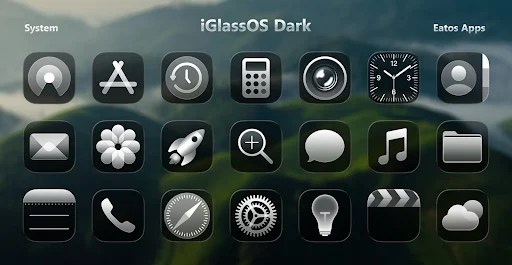
| Updated On | 09/05/2026 |
|---|---|
| Category | Personalization |
| Version | 1.4.5 |
| Size | 39 MB |
| Requires | Android 5.0 |
| Get it on | Google Play |
| MOD Features | Paid/Patched |
- Paid/Patched
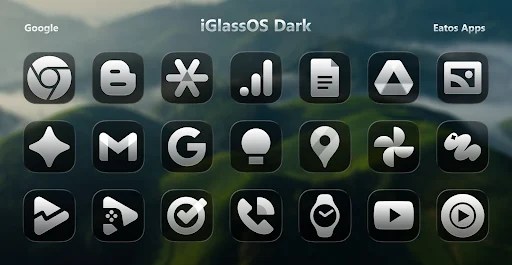
If you are looking for a new look for your Android phone with a luxurious, modern and mysterious style, iGlassOS Dark Icon Pack will definitely satisfy you at first sight. The application brings a unique set of glossy glass icons combined with attractive dark tones, creating a sense of both sophistication and technology.
Note: You can also refer to some other interface personalization applications on our website such as Pixly 3D Icon Pack or iOS Liquid Glass Icon Pack.
Introduce about iGlassOS Dark Icon Pack
iGlassOS Dark Icon Pack is an Android interface customization application developed by Eatos, aimed at those who love minimalism, modernity and sharpness. When installing this icon pack, users will feel a clear difference in the layout and design of the icons. The dark tones combined with the glossy glass effect create a luxurious style, suitable for many types of wallpapers, especially interfaces with black or dark gray backgrounds.
Inside the application, users can explore more than 4,300 uniformly designed application icons. Each icon is refreshed in a transparent, deep and highly recognizable style. Not only does the default icon exist, the application also provides many alternatives for the same application for you to freely adjust as you like.
In addition, iGlassOS Dark Icon Pack also comes with hundreds of wallpapers that match the dark tone, making the overall interface more harmonious. The application is compatible with many popular launchers such as Nova, Lawnchair, Hyperion, etc.
Minimalist, modern and sharp icon design
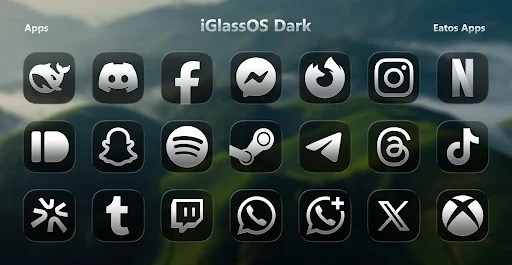
At first glance, the iGlassOS Dark Icon Pack successfully grabs attention due to its fantastic unique icon design style. Each icon in the icon pack has been covered with a glossy effect layer and the overall set has a mysterious dark tone that creates a luxurious, cohesive and futuristic identity. The icons are designed in sync, refining every detail such as rounded corners, reflections, boldness and depth to bring a sense of uniformity across the entire screen.
An obvious plus is that this icon set still retains the ability to identify applications very well. Although redesigned, the icons do not make users feel unfamiliar. On the contrary, the way to minimize the cumbersome details makes everything more intuitive and neat. This style is suitable for those who love a modern, unadorned interface, but still stands out when combined with dark wallpapers or AMOLED screens.
More than 4,300 application icons
The next highlight of iGlassOS Dark Icon Pack is the extremely large icon store. According to information from the publisher Eatos, the application currently provides more than 4,300 icons designed in the same dark and glossy style. Thanks to the large number, this icon pack can cover most of the popular applications on Android today, from social networks, office tools, games, to system applications.
In addition, with popular applications, the developer also provides many alternative icons, allowing you to customize the interface according to your personal preferences. This creates flexibility in presentation, helping you not be limited to a single design style. Each user can remix the interface in their own way, bringing a new feeling while still maintaining overall consistency.
Wide compatibility with many launchers
One of the great advantages of iGlassOS Dark Icon Pack is its compatibility with most popular Android launchers. The application works well on launchers such as Nova, Lawnchair, Hyperion, Smart Launcher, Niagara, and many other launchers that support custom icon packs. This helps users not be tied to a single platform but still be able to experience the optimal interface in the style of the icon set.
A nice feature along with broad compatibility is Dynamic Calendar – which is a small feature but handy. The application will change the icon for the calendar app based on the current date – this gives a more lively and flexible feel at the top level interface.
For Samsung devices, especially the Galaxy line using One UI, users need to install the Theme Park tool from the Galaxy Store to be able to apply the icon pack. This is a point to note but it is also very easy to do according to the developer’s instructions.
Integrated high-quality wallpaper store
Aside from offering icons, iGlassOS Dark Icon Pack also features a wallpaper store with high-quality wallpapers that match the glossy icon style. The wallpapersare usually dark, neutral or light gradient toned so that the icons can stand out on the home screen without adding confusion to the home screen or fighting other colors.
With over 347 wallpapers included, there is enough of a choice to find a background that suits your style. Each wallpaper is also optimized for resolution and layout to create a harmonious feel when combined with the transparent glossy icons. Overall, it helps bring the visual experience together and makes an Android phone into a complete aesthetic space.
The wallpaper store is built into the application interface, allowing users to preview and apply immediately without installing additional support tools. Thanks to the synchronous combination of icons and wallpapers, the overall interface becomes seamless, aesthetic and brings a sense of harmony from small details to the whole.
Download iGlassOS Dark Icon Pack MOD APK for Android
Overall, iGlassOS Dark Icon Pack is an interesting choice for those who want to refresh the Android interface in a dark, glossy and sophisticated style. The rich icon set, accompanied by wallpapers and dynamic calendar support, is easy to apply to many popular launchers. If you prefer a dark interface with a clear, sharp feel, this is an application worth considering trying.