FX File Explorer MOD APK 9.1.0.8 (Plus/Root)
NextApp Inc. | 0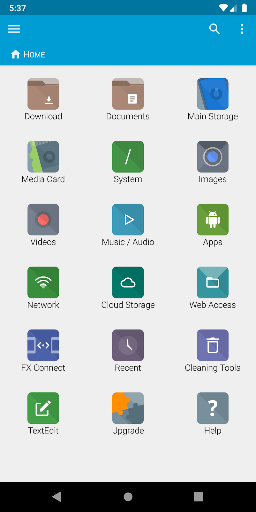
| Updated On | 18/05/2026 |
|---|---|
| Category | Utilities |
| Version | 9.1.0.8 |
| Size | 32 MB |
| Requires | Android 5.0 |
| Get it on | Google Play |
| MOD Features | Plus/Root |
- Plus/Root
Instead of fighting with clunky menus, you’ll streamline your digital inventory using a native Android app built for efficiency. FX File Explorer turns basic directory navigation into a smooth, desktop-class experience that keeps your daily productivity high.
Note: Don’t forget to check out some other outstanding applications on our website such as Solid Explorer File Manager or ES File Explorer.
Introduce about FX File Explorer
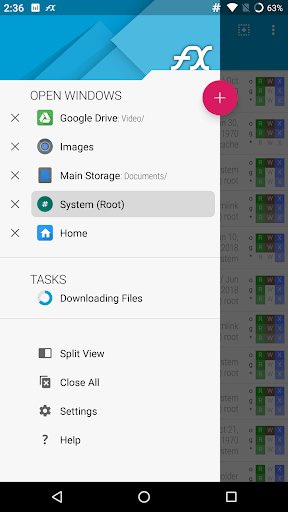
The main flow of FX File Explorer revolves around a central Home Screen dashboard that acts as your organizational hub. You’ll quickly jump to essential bookmarks and storage shortcuts right from this menu so you aren’t digging through endless subfolders. Browsing local directories and connected SD cards feels snappy, whether you stick to a traditional list view or use the advanced dual-pane layout.
Master the dual-pane split view
The desktop-class dual-pane interface is a massive time-saver for organizing your local storage drives. Tapping the window icon enables Split View, letting you look at two different folders at the exact same time. This layout completely eliminates the need to constantly mash the back button when shifting items around.
Moving files between directories is as simple as dragging and dropping them directly between the two active locations. FX File Explorer uses this mode to handle heavy-duty management tasks, making it a huge upgrade over standard single-window navigation. It’s especially useful when you’re trying to reorganize massive media folders on your phone.
Connect across networks and devices
File management goes beyond local storage thanks to built-in wireless transfers. By setting up Web Access in the network settings, you can organize your phone’s files right from a desktop browser. As long as your computer is on the same Wi-Fi network, you’ll get a much bigger screen to easily sort through your digital library.
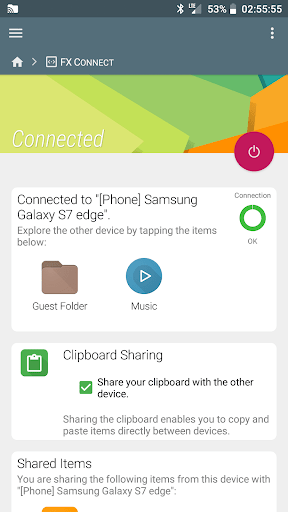
Moving items between mobile devices is just as easy using FX Connect for high-speed transfers via Wi-Fi Direct. You can completely ditch slow Bluetooth connections and annoying cables when sharing large archives with friends. The app also handles remote access across diverse environments, making it simple to connect to SMB, FTP, SSH, and various cloud services.
Utilize integrated media and editing tools
Instead of juggling a bunch of third-party apps, this file manager puts everything you need right in one place. You can view media or tweak text documents using the built-in players and editors without ever leaving the main screen. It keeps things moving smoothly while you dig through your SD cards or connected cloud drives.
You can also tackle basic management tasks like copying, moving, or archiving data into highly compressed formats. Firing up FX File Explorer gives you instant access to these integrated tools so you can handle your media efficiently. It’s a streamlined setup that saves time and keeps your device completely free from unnecessary bloatware.
Reclaim space with cleaning tools
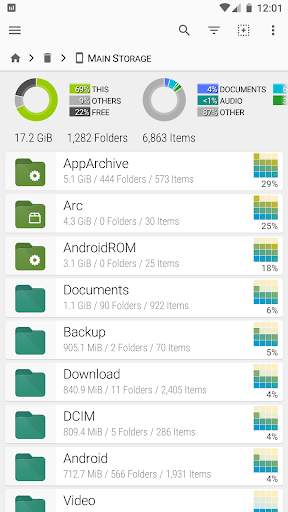
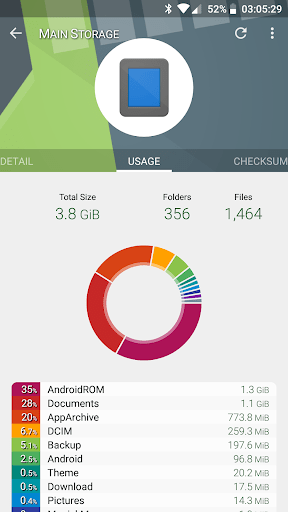
There’s nothing worse than running out of storage right before a huge game update drops. FX File Explorer offers a useful Cleaning Tools feature that displays what’s eating away your memory. The interface breaks down your directories so that you can see folders that are too large and need to shrink.
With this visual configuration you’ll be able to easily track down oversized files or duplicates taking up space on your disk. When you see those unwanted items, you may delete them instantly from the dashboard to free up your storage. This is an intuitive way to use both your internal memory and SD cards optimally.
Dive into advanced developer utilities
Basic navigation is adequate for casual users but developers will find the real treat lurking further into the menus. If the device is modified, it will provide you with full root access to modify core system directories that are usually locked down. You will experiment heavily with the mobile hardware to bring optimum output from the hardware.
The hex viewer is a special utility which allows you to view the raw data in your files. You can run shell scripts to complete complicated tasks straight from your phone. It brings together all these sophisticated tools, providing discriminating techno enthusiasts with all they require, and in one package.
Enjoy a strict privacy-first environment
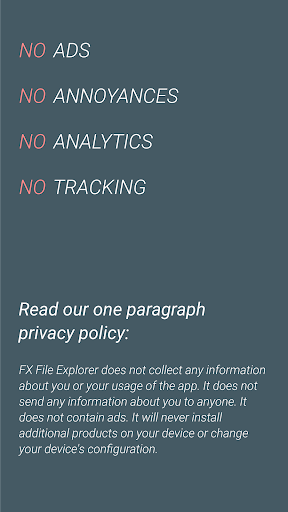
Most apps these days try to harvest your personal data, so finding a tool that actually respects your boundaries is a nice change of pace. This file manager sticks to a strict privacy-first design to keep all your local and network activities completely confidential. You won’t have to worry about hidden analytics tracking your every move or reporting your daily habits back to a remote server.
FX File Explorer also ditches the intrusive ads that usually clutter up standard free mobile tools. Since it features zero advertisements, user tracking, or annoying bloatware, the whole interface stays remarkably clean. You can just focus on managing your files without constantly dodging pop-ups or sponsored content.
Download FX File Explorer MOD APK for Android
The FX File Explorer is an excellent option if you are looking for an ad-free file manager that guarantees your privacy. It can deal with local storage, cloud services and network drives without flinching. Don’t forget to grab the Plus License to get access to the advanced features of the app as the base app is free.