Clipboard Manager MOD APK 5.7 (Premium Unlocked)
Jetpof Apps | 0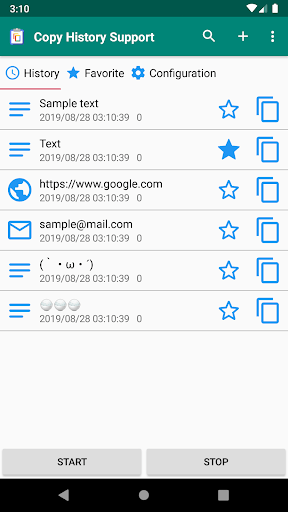
| Updated On | 22/11/2025 |
|---|---|
| Category | Productivity |
| Version | 5.7 |
| Size | 16 MB |
| Requires | Android 6.0 |
| Get it on | Google Play |
| MOD Features | Premium Unlocked |
- Premium Unlocked
Clipboard Manager seems a straightforward way to save all clipboard history and manage it better. Also, it allows you to review everything you’ve copied in a matter of steps, create your own notes, classify by folder, and access it quickly at any time. Let’s find out a little more.
Note: Don’t forget to refer to some other outstanding applications on our website such as Manus AI or Xodo PDF.
Introduce about Clipboard Manager
During the process of using the phone, copying text happens frequently but users do not always remember what they have copied. However, Clipboard Manager helps solve that problem by saving the entire clipboard history for you to review when needed.
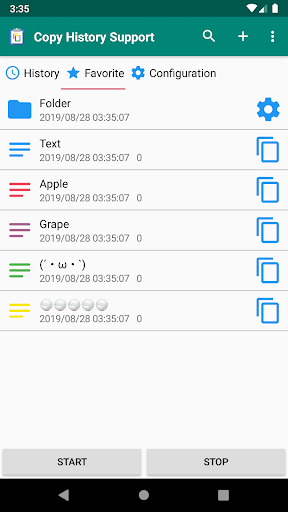
When opening the application, you can easily see the list of copied text, arranged in chronological order. Thanks to that, you do not have to search for each content in many different places. In addition, the application allows you to create separate folders to classify information, making management more neat. In addition to the clipboard history, the application also supports creating quick notes. With just a few steps, you can record ideas or temporarily save an important piece of content.
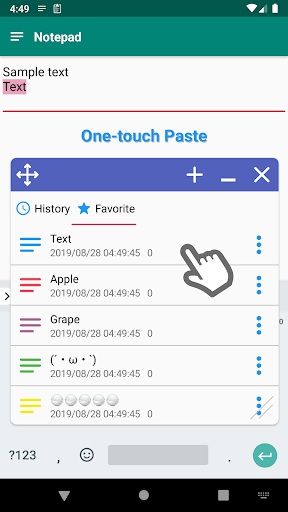
More importantly, the interface is designed in a simple direction, suitable for beginners. You can search for text in the list, share content to other applications or copy it with just one touch.
Save the entire clipboard history automatically
Clipboard Manager is designed to record all the content that users copy on the phone. Every time you copy a piece of text, the application automatically creates a new item and saves it in the history. Thanks to this mechanism, you can go back to view any previously copied content without having to manually remember it. This is useful for those who often process text, such as quick notes, saving OTP codes, product descriptions or links that need to be reused.
The application displays a list of content in chronological order, making it easier for you to find old information. Besides the convenience, automatic saving also supports situations where users accidentally copy the wrong text. You can reopen the list to restore the previously copied text without any trouble.
For new users, this way of operating is quite familiar because you do not have to manually activate it each time. The entire operation is processed in the background and does not affect the daily experience. Therefore, this feature becomes the main reason why the application is chosen by many people to manage the clipboard more effectively.
Organize content by folder
A notable strength of Clipboard Manager lies in the ability to categorize content by folder. When used for a long time, the clipboard history will increase, and this makes it more difficult to find old items. The application allows you to create multiple folders with separate names to put each piece of text in the right group. For example, you can create folders for work, study, personal information or content to post online.
When you need to change the position or rearrange as you like, you just drag and drop or use simple operations. This feature is suitable for those who want to keep everything neat and tidy. At the same time, organizing by folder makes each work session clearer. Users can easily access related content groups in just a few seconds.
Create quick notes and edit content conveniently
Clipboard Manager not only saves copied text, but also allows you to create quick notes right in the application. When you need to save an idea, a memo or any content that you do not want to copy, you can enter it directly into the application and save it as a separate item. This feature works similar to a mini note application, but is simpler and is attached to the clipboard history for you to manage in the same system.
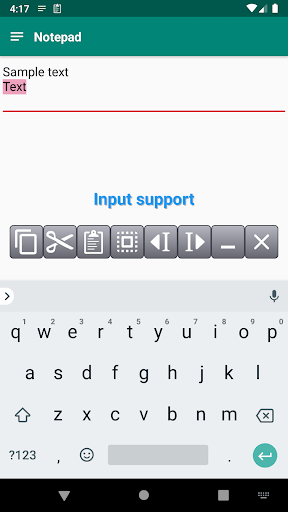
In addition to creating notes, the application also supports editing content. When you want to add or edit the text, just open the saved item and adjust it again. This helps users save time because they do not have to write from the beginning. Besides, you can share notes via other applications or copy them quickly.
Quick search in a long clipboard list
When the number of items in the clipboard history increases, finding a specific text sometimes takes a long time. Clipboard Manager solves this problem with a quick search feature. You just need to enter a keyword or a piece of content, the application will filter and display the appropriate items immediately. This saves a lot of time, especially when you often copy many pieces of information every day.
This feature is suitable for users who have the habit of saving many pieces of text from many different sources. When you need to find an old description or a previously created note, the search operation helps you access the content faster than scrolling through a long list. In addition, searching is also useful when you edit or categorize content. You can find a group of items by keyword and then put them in the desired folder.
Download Clipboard Manager MOD APK for Android
Overall, Clipboard Manager brings a distinct sense of convenience to those who often copy and process text on the phone. Thanks to the ability to automatically save history, classify by folder and support quick note creation, the application helps the information management process become neater and easier to control.