
Tor Browser APK 15.0.19 (140.13.0esr) (Official) for Android
The Tor Project | 0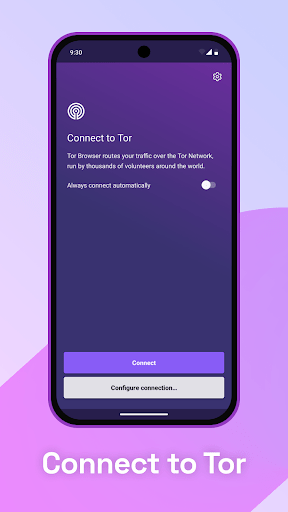

| Updated On | 23/05/2026 |
|---|---|
| Category | Communication |
| Version | 15.0.19 (140.13.0esr) |
| Size | 104 MB |
| Requires | Android 5.0 |
| Get it on | Google Play |
| MOD Features | No |
- Coming Soon
In an era where online privacy is increasingly threatened, Tor Browser appears as a powerful shield that helps users hide their identity, bypass firewalls and access the internet safely. With a simple interface but full of security features, this application is becoming the top choice for those who want to keep their traces hidden when surfing the web.
Note: You can also refer to some other popular browsers on our website such as OH Private Web Browser or Herond Private Adblock Browser.
Introduce about Tor Browser
Tor Browser is a browser developed by The Tor Project, helping users protect their privacy when accessing the internet. With a simple design, this application allows you to access websites more securely thanks to the multi-layer encryption system. All data transmitted through Tor goes through three intermediate servers, which helps hide the real IP address and makes tracking very difficult.
One notable point is that this application automatically clears the browsing history after each time the browser is closed. This reduces the risk of being tracked via cookies or cache. In addition, built-in security features such as NoScript and prioritizing the use of HTTPS help improve safety when accessing websites.
Tor Browser is currently compatible with many platforms such as Windows, macOS, Linux and Android. The friendly interface makes it easy for users to get used to, even when they are new to using it. Therefore, the application is suitable for those who are looking for an anonymous browsing solution while still ensuring efficiency.
Browse anonymously and protect privacy
Tor Browser is designed to protect users’ privacy by hiding their real IP address when accessing the internet. Instead of connecting directly to the website’s server, this browser routes data through three intermediary servers in the Tor network. This mechanism helps prevent the identification of the user’s true origin. No one, not even your internet service provider, can know which websites you are visiting.
At the same time, it is difficult for the website to determine your real location. This is very useful in cases where you need to access blocked websites or do not want to leave a trace. In addition, every time you close this application, all browsing history and cookies are completely deleted. Not saving browser data after each session helps you maintain a higher level of privacy than regular browsers.
Built-in powerful security tools
Tor Browser is built on the Firefox Extended Support Release (ESR) platform, but has been customized to enhance security. Inside the browser, users will find built-in extensions such as NoScript and HTTPS Everywhere. NoScript plays a role in blocking dangerous code such as JavaScript, which is often exploited to track user activities.
Meanwhile, HTTPS Everywhere automatically switches websites to the HTTPS version if supported, providing better connection encryption and avoiding the risk of data theft. In addition, the application also limits features that can reveal information such as plugins, system fonts or screen resolution.
All of these factors help reduce the possibility of “browser fingerprinting” – a common technique used by advertising companies. Users do not need to install additional cumbersome security tools because everything necessary is integrated right when installing this browser.
Easily access blocked websites
In many cases, users cannot access some websites due to censorship or blocking by their network service providers. Tor Browser provides an effective solution to overcome that barrier. Thanks to the Tor network system, you can access regionally restricted websites without using VPN or proxy.
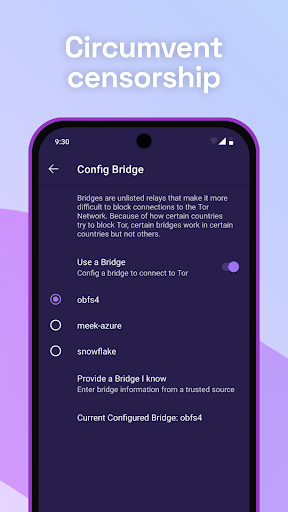
This browser also supports setting up bridges to connect to the Tor network when you are in areas with strong censorship, such as countries that restrict internet freedom. The connection process takes place silently and securely, helping you use the internet more freely without being detected. Setting up bridge options is also quite simple, suitable for new users.
Friendly interface, easy to use
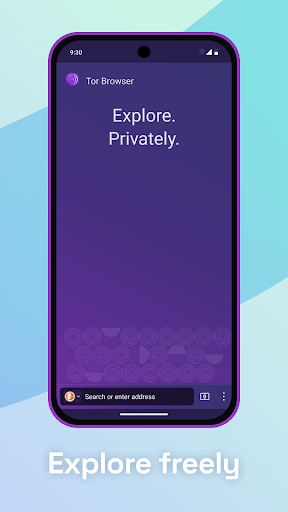
Although designed with high security goals, Tor Browser still maintains a familiar and user-friendly interface. This browser has a similar layout to Firefox, so it is easy to get used to, especially for those who have used popular browsers before. Function buttons such as the address bar, new tab, settings menu or add-on manager are all clearly arranged and easy to access.
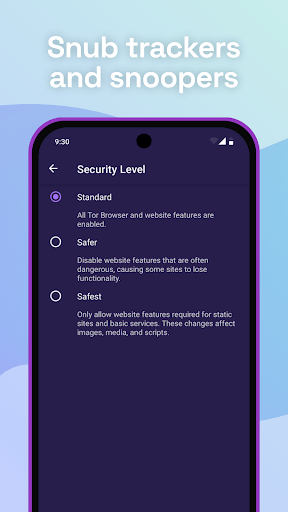
Users do not need to perform complicated configuration operations but can still use it immediately after installation. For beginners, Tor Browser also provides a “Guided Tour” mode to better understand how it works and basic functions. In addition, the protection levels are divided into many levels (Standard, High, Very High) for users to choose according to their needs.
Download Tor Browser APK for Android
Overall, Tor Browser is an ideal choice for those who value privacy and want better control over their online activities. With multi-layer encryption, an easy-to-use interface and the ability to access restricted websites, this application provides a secure, private and efficient browsing experience.