Caelus Duotone Icon Pack MOD APK 5.3.2 (Paid/Patched)
One4Studio | 0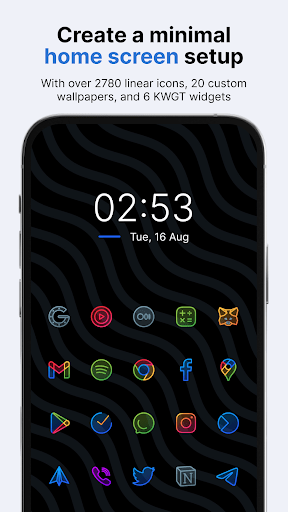
| Updated On | 05/06/2026 |
|---|---|
| Category | Personalization |
| Version | 5.3.2 |
| Size | 61 MB |
| Requires | Android 7.0 |
| Get it on | Google Play |
| MOD Features | Paid/Patched |
- Paid/Patched
Caelus Duotone Icon Pack is an icon pack for Android, providing linear style icons with semi-transparent colors in a very eye-catching “duotone” style. These icons are designed on a 24×24 px grid with a line thickness of 1 px, to ensure consistency in size and style across the system.
Note: You can also refer to some other popular icon pack applications on our website such as Mello Night Icon Pack or Doodle Iconpack.
Introduce about Caelus Duotone Icon Pack
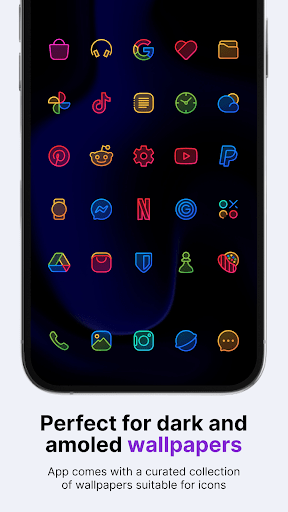
Caelus Duotone Icon Pack is an application that helps change the icon interface on Android phones, developed by publisher One4Studio. This application impresses with its “duotone” design style – each icon is decorated with two harmonious tones, thin lines, creating a modern and neat feeling. When combined with a dark or AMOLED wallpaper, the device interface becomes more prominent but still retains its sophistication.
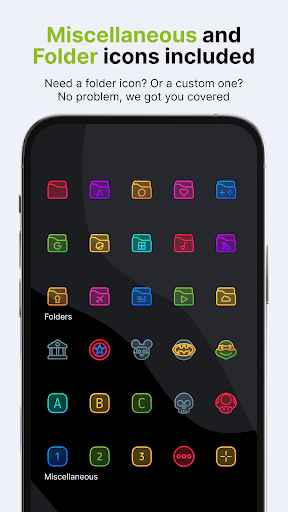
The app currently offers more than 4,000 different icons, along with 20 suitable wallpapers and 6 KWGT widgets to help users easily customize the entire interface. In addition, Caelus Duotone also supports dynamic calendars, folder icons and overlay capabilities for applications that do not have their own icons. Users can also submit requests for additional icons if they want.
In addition, Caelus Duotone is compatible with many popular launchers such as Nova, Lawnchair, Niagara, and can be used on Samsung One UI when combined with Theme Park. This is a suitable choice for those who love neatness and synchronization but still want to add a bit of personality to their device.
Sophisticated Duotone-style icon design
Caelus Duotone Icon Pack stands out thanks to its harmonious duotone design style. The icons in the app are drawn with thin lines, placed on a semi-transparent background, creating a gentle and synchronous feeling. Each icon has a clear outline, keeping the identity of the original application but with a fresher look. With this style, the phone interface looks clean, not confusing and still creates attraction when looking at it.
The duotone style is especially suitable when combined with dark wallpapers or AMOLED backgrounds. At this time, the color of the icon will stand out more clearly, creating a beautiful visual effect without being too flashy. In addition, the icon set is aligned according to the standard ratio, helping the icons on the screen look balanced and professional.
A massive icon store with more than 4,000 icons
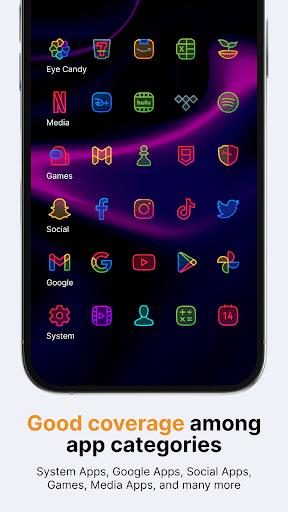
One of the strengths that helps Caelus Duotone Icon Pack score points with users is the extremely rich number of icons. Up to now, the application provides more than 4,000 icons with a full range of popular applications from systems, social networks to learning tools, entertainment, photo editing. Having many icons helps users easily synchronize the entire interface without worrying about missing anything.
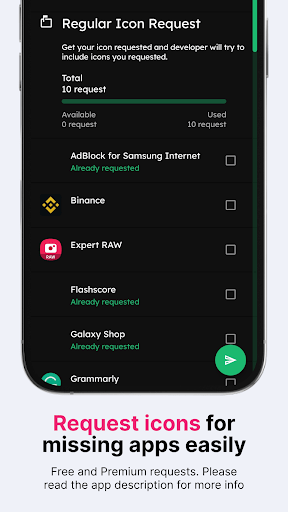
The developer One4Studio also regularly updates new icons. Every two weeks, the application has an upgraded version that adds many new icons or adjusts the existing icons to make them more complete. In addition, users are allowed to submit requests to add icons for apps that are not yet supported. You can choose to submit a request for free or use the paid advanced request feature if you want to be processed faster.
Integrated wallpapers and widgets support synchronized personalization
In addition to the rich icon store, Caelus Duotone Icon Pack also provides 20 more custom wallpapers designed in sync with the icon style. These wallpapers help users easily coordinate the overall interface color without having to search outside. Thanks to the uniformity in color and style, your entire home screen will become much more harmonious.
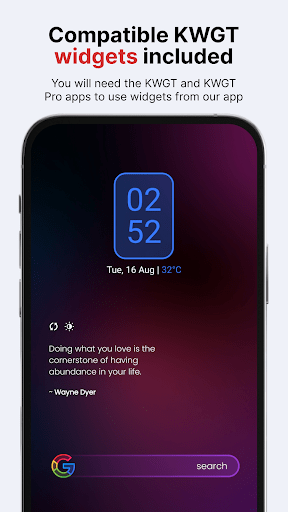
The application also comes with 6 KWGT widgets to help you personalize the screen to your liking. The pre-designed widgets include clocks, weather, and other information widgets, which are compatible with the overall duotone style. This is a useful solution for you to create an interface that is both beautiful and convenient without having to install many other additional applications.
The integration of these components shows that Caelus Duotone not only focuses on icons but also aims at a comprehensive customization experience for users. For those who like a consistent interface from icons to widgets, this will be a big plus worth considering.
Compatible with many launchers and supports flexible customization
Caelus Duotone Icon Pack is compatible with most popular launchers on Android today. Some supported launchers include Nova Launcher, Lawnchair, Niagara, Apex, Hyperion, and many other applications. Users can apply the icon pack easily through the launcher’s settings interface without complicated configuration.
For Samsung devices using One UI, you can still apply the Caelus Duotone icon through the Theme Park application (part of the Good Lock toolkit). Thanks to that, even default interface systems can take advantage of this icon pack without having to switch to an external launcher. In addition, the application also supports dynamic calendar icons, allowing the calendar application icon to automatically change according to the day of the month.
Download Caelus Duotone Icon Pack MOD APK for Android
In conclusion, Caelus Duotone Icon Pack is an excellent choice for fans of a refined, elegant interface with colorful accents. With a modern design, rich icons library and customizable compatibility the application provides a full personalisation experience on Android devices.